

Picture this: a patient arrives 15 minutes early for their appointment, only to spend 20 minutes filling out repetitive paperwork while juggling a clipboard and searching for their insurance card. Meanwhile, your front desk staff frantically types handwritten forms into the system, creating bottlenecks that push every subsequent appointment behind schedule. The problem is getting worse – in 2022, 22 percent of healthcare staff said denial rates were increasing, but this number jumped to 73 percent in 2024.
The Hidden Cost of Inefficient Patient Intake
Poor patient intake process implementations create problems that go far beyond long wait times or messy paperwork. The real damage happens behind the scenes, where intake errors cascade through your entire revenue cycle.
When patients struggle through confusing forms or wait endlessly in reception areas, their stress levels spike before they even see a provider. This sets a negative tone that influences their entire care experience, leading to lower satisfaction scores and reduced loyalty. More critically, intake errors create billing disasters – incorrect insurance information leads to claim denials, incomplete medical histories compromise care quality, and inefficient workflows burn out your staff.
The financial impact hits hard. Practices with optimized intake processes see 30% fewer claim denials, 40% reduction in administrative costs, and 25% improvement in patient retention rates. Yet most healthcare providers continue using outdated systems that were designed for a different era of healthcare delivery.
Staff members spend countless hours on manual data entry, chasing missing information, and correcting mistakes that could’ve been prevented at the front door. These inefficiencies don’t just cost money – they steal time that could be spent on actual patient care.
The current patient intake workflow problems create a domino effect that touches every aspect of practice operations. When one patient’s paperwork takes too long, it delays everyone who comes after them.
11 Strategies to Transform Your Patient Intake Process
Building an efficient patient intake system requires strategic thinking and the right tools. Here’s how successful practices are solving their intake challenges.
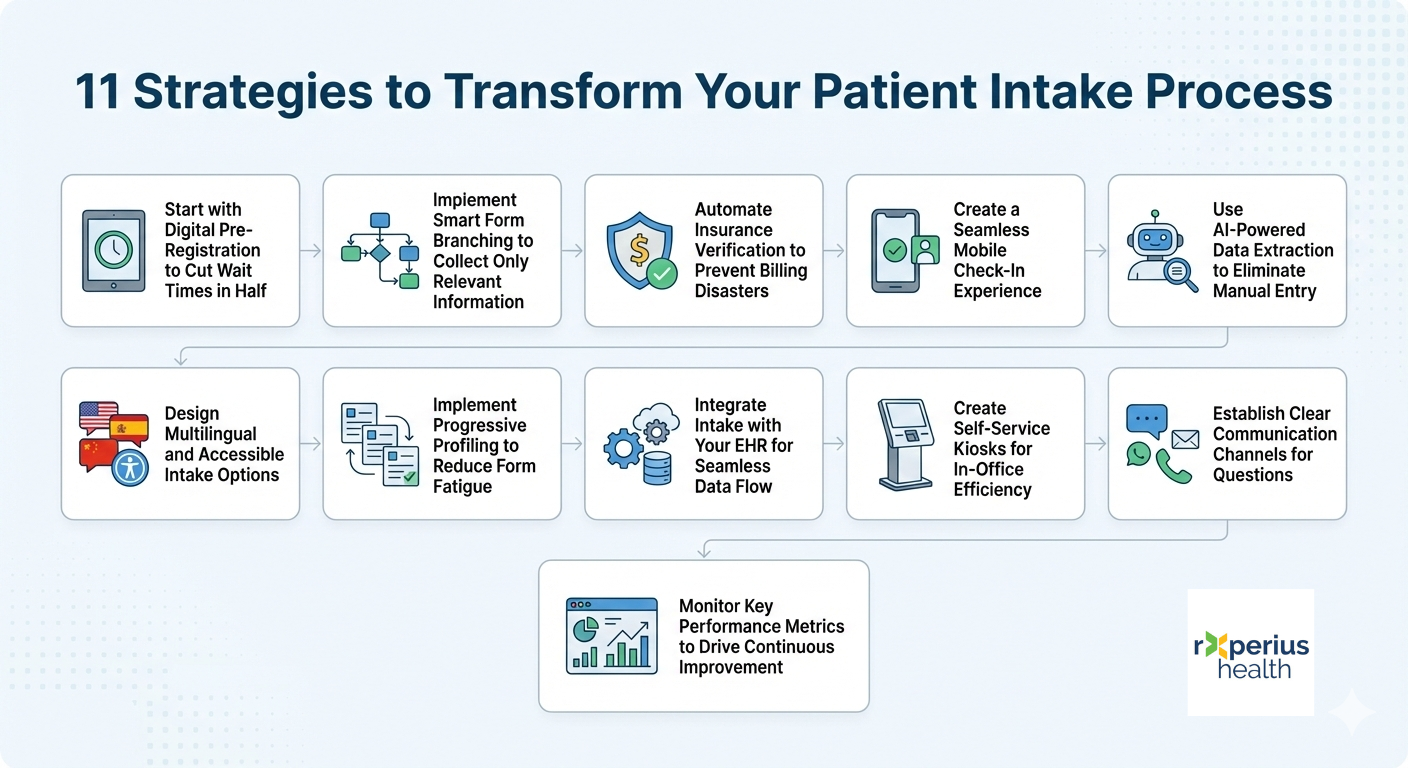
1. Start with Digital Pre-Registration to Cut Wait Times in Half
Digital patient intake allows patients to complete forms before they arrive at your practice. This simple change eliminates the clipboard shuffle and gives your staff time to review information beforehand, creating a smoother flow from check-in to exam room.
Research shows that 61% of patients use digital forms, proving that patients want this convenience. When patients can fill out their information at home, they arrive relaxed and prepared rather than stressed and rushed.
Digital pre-registration also helps your staff prepare for appointments. They can review medical histories, verify insurance information, and identify any special needs before the patient walks through the door.
2. Implement Smart Form Branching to Collect Only Relevant Information
Stop overwhelming patients with one-size-fits-all patient intake forms. Use conditional logic that shows only relevant questions based on appointment type, previous visits, or patient demographics.
Smart branching reduces form completion time by 60% while improving data quality. A returning patient shouldn’t have to re-enter their entire medical history data, and someone coming for a routine check-up doesn’t need surgery-specific questions.
This approach respects patients’ time while ensuring you collect the exact information needed for their specific visit. It’s a win-win that makes the intake process feel personalized rather than bureaucratic.
3. Automate Insurance Verification to Prevent Billing Disasters
Real-time insurance verification catches coverage issues before they become billing nightmares. Automated systems check eligibility, co-pay amounts, and authorization requirements instantly, reducing claim denials by up to 40%.
Manual verification takes staff time and often happens too late to prevent problems. Automated systems work in the background while patients complete their forms, flagging issues immediately so you can address them during the visit.
This proactive approach prevents the frustrating situation where patients receive surprise bills weeks later because their insurance information was outdated or incorrect.
4. Create a Seamless Mobile Check-In Experience
Enable patients to check in from their car or while walking into your building. Mobile check-in reduces lobby congestion, improves social distancing, and gives patients control over their arrival experience.
Practices using mobile check-in report a 3.8% no-show rate during the last year, significantly lower than industry averages. When patients can manage their arrival digitally, they’re more likely to follow through with appointments.
Mobile solutions also allow patients to update information on the spot if something has changed since their last visit, keeping records current without additional staff intervention.
5. Use AI-Powered Data Extraction to Eliminate Manual Entry
Deploy intelligent document processing that automatically extracts information from insurance cards, driver’s licenses, and referral letters. This technology reduces data entry errors by 85% while freeing staff for higher-value activities.
AI can read handwriting, interpret different document formats, and populate your system automatically. Staff members no longer need to squint at poorly photocopied insurance cards or try to decipher rushed handwriting.
This technology also works with mobile devices, allowing patients to snap photos of their documents and have the information extracted instantly during the intake process.
6. Design Multilingual and Accessible Intake Options
Break down language barriers with professionally translated forms and accessibility features for patients with disabilities. This inclusive approach prevents miscommunication and ensures compliance with ADA requirements.
Multilingual options show respect for your diverse patient population while reducing the likelihood of errors that occur when patients don’t fully understand questions. Screen readers and other assistive technologies help ensure everyone can complete forms independently.
Consider offering forms in the most common languages in your area, and make sure your staff knows how to assist patients who need additional support.
7. Implement Progressive Profiling to Reduce Form Fatigue
Collect patient information gradually across multiple visits rather than overwhelming new patients with extensive forms. This approach improves completion rates while building detailed patient profiles over time.
New patients can start with basic demographic and insurance information, then provide additional details about their medical history during follow-up visits. This makes the initial experience less daunting while still gathering all necessary information.
Progressive profiling works especially well for practices with high patient retention, as you can build rich profiles without creating barriers to entry.
8. Integrate Intake with Your EHR for Seamless Data Flow
Ensure intake information flows directly into patient records without manual intervention. Proper integration eliminates duplicate data entry and maintains information accuracy across all systems.
When your intake system talks directly to your EHR, information automatically appears in the right fields. This prevents transcription errors and saves staff time that would otherwise be spent on data entry.
Integration also allows for real-time validation, alerting staff immediately if required information is missing or if there are conflicts with existing records.
9. Create Self-Service Kiosks for In-Office Efficiency
Deploy user-friendly kiosks that handle basic check-in tasks while staff focus on complex patient needs. Modern kiosks can process payments, update information, and even capture vital signs.
Kiosks work particularly well in waiting areas where patients have time to complete tasks without feeling rushed. They can also reduce physical contact, which many patients prefer.
10. Establish Clear Communication Channels for Questions
Provide multiple ways for patients to get help during the patient intake process, including live chat, phone support, and in-person assistance. Clear communication prevents abandoned forms and reduces staff interruptions.
When patients can easily get help, they’re more likely to complete forms accurately and fully. This reduces back-and-forth communication later and prevents delays during their visit.
Consider offering different support options for different comfort levels – some patients prefer phone calls, while others like text-based help.
11. Monitor Key Performance Metrics to Drive Continuous Improvement
Track metrics like completion rates, time-to-completion, and error frequencies to identify improvement opportunities. Data-driven decisions ensure your patient intake process evolves with patient needs and operational requirements.
Regular monitoring helps you spot problems before they become major issues. If completion rates drop or error rates increase, you can investigate and make adjustments quickly.
Use patient feedback alongside performance metrics to get a complete picture of how your intake process is working and where improvements are needed.
|
Intake Method |
Average Completion Time |
Error Rate |
Patient Satisfaction |
|
Paper Forms |
15-20 minutes |
12-15% |
6.2/10 |
|
Basic Digital |
8-12 minutes |
6-8% |
7.8/10 |
|
Smart Digital |
5-8 minutes |
2-3% |
8.9/10 |
Transform Your Practice Starting Today
1. What’s the average cost of implementing a digital patient intake system?
Implementation costs vary widely based on practice size and feature requirements. Basic solutions start around $50 per provider monthly, while advanced platforms range from $200-500 monthly.
2. How do I handle patients who aren’t comfortable with technology?
Maintain hybrid options by providing tablets or kiosks in the office with staff assistance available. Offer paper forms as a backup while gradually introducing digital options.
3. Can digital intake systems integrate with any EHR platform?
Most modern intake solutions offer integrations with major EHR systems like Epic, Cerner, and Athena. However, integration complexity varies, so always verify compatibility before purchasing.